
If you've never touched a line of code but need a website online now, Create a website with Claude It's probably the fastest way to achieve this without relying on a developer. Unlike builders like Wix ADI or Durable, which we already compared in our article about Artificial intelligence for creating websitesHere, you don’t fill out a questionnaire: you describe what you want in natural language, and Claude writes the complete code—HTML, CSS, and JavaScript—right before your eyes. This is a basic introductory course designed for those starting from scratch: what to consider before you begin, how to craft your first prompt, how to proceed section by section, and how to finish by publishing the site online.
Before you start building a website with Claude: what you need to keep in mind
Before opening the chat and asking Claude ...have someone "build you a website," it is best to resolve three things. Skipping this step is the number one reason why people end up with 15 different versions of the same site—and none of them finished.
Define the site's objective in one sentence. Is it a landing page to attract clients, a portfolio, a small shop? When you go to Create a website with Claude, that phrase becomes the basis for your first prompt. Gather your actual content before writing the prompt. Business name, copy, phone number, social media links, and brand colors (if you already have them). Claude can generate placeholder content, but a site containing your actual information from the start saves you half an hour of replacing generic text. Choose where you are going to work. You can use Claude directly at claude.ai (the website uses the Artifacts feature to display code live) or Claude Code if you are comfortable using the terminal. For this basic course, we will stick with claude.ai, which requires no installation.
This same "define first, generate later" criterion is what we explain in How to choose the right AI for your business: The tool performs according to the clarity of what you ask of it, not the other way around.
How to get started: your first prompt to create a website with Claude
With the objective and content ready, the first real step to Create a website with Claude is to write an initial prompt that includes:
- The type of business or project.
- The sections you need (home, services, contact, etc.).
- The visual style you are looking for (minimalist, colorful, corporate).
- Any color or text you have already defined.
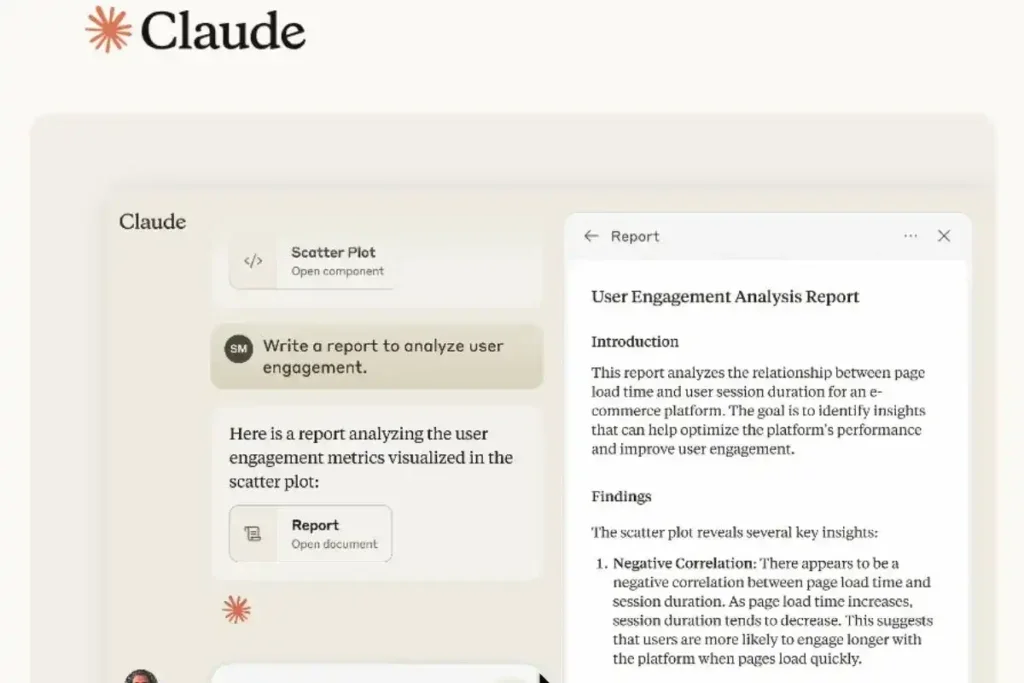
An example of a functional initial prompt would be: Create an HTML and CSS landing page for a coffee shop named [name], featuring Home, Menu, Location, and Contact sections, with a warm style using brown and cream tones. Claude will respond by generating the site within an Artifact, which you can see rendered in real time without leaving the chat. This is the big difference compared to asking a plain-text AI for the code: here you see the visual result from the very first minute, which makes it Create a website with Claude it feels more like designing than programming.
How to proceed with creating a website using Claude: building the site section by section.
Once you have the first version, the most common mistake is asking for too many changes in a single message. Proceed in stages:
- Correct one section at a time. "Change the header color to blue" yields better results than ten requests combined.
- Explicitly request responsiveness. Tell Claude that the design needs to look good on mobile, tablet, and desktop; if you don't mention it, he sometimes prioritizes only the desktop view.
- Add functionality gradually. Contact form, WhatsApp button, image gallery: each new element is a separate prompt, so you can check that nothing from before was broken.
- Save versions you like. If a change doesn't convince you, you can ask Claude to revert to the previous version instead of continuing to make blind modifications.
This iterative process connects with something we already touched on in Prompts that work to get the most out of AI for your business: The more specific and progressive you are in your requests, the less you beat around the bush. Create a website with Claude It is not a "one prompt and you're done" process, but rather an ongoing conversation until you reach the result you envisioned.
How to finish: final review and deployment
Once the site looks the way you want it to, there are two steps left before considering it finished.
1. Final review
Ask Claude to review the text (spelling, coherence), verify that internal links work, and confirm that the design is responsive. Now is the time to view the site on your own mobile phone, not just in the chat.
2. Publish it on the internet
You can download the code generated by Claude as HTML, CSS, and JS files. To publish it, the simplest options for a beginner are:
- Netlify o Vercel: You drag the project folder, and in seconds you have a free public URL.
- GitHub Pages: It requires uploading the code to a repository, but it is free and stable if you already use GitHub.
- Your own hosting: If you already have a domain and hosting set up, just upload the files via FTP and you're all set.

Once published, you're no longer just testing: you have a real, visible website, achieved by Create a website with Claude ...from scratch without having written a single line of code yourself. From that point on, you can continue requesting any future changes via chat and republish the updated version.
Frequently Asked Questions
¿Necesito saber programar para crear una web con Claude? No. You simply need to describe what you need in Spanish; Claude handles translating it into code.
Can I create an online store with Claude? For simple catalogs, yes, but for complex payments and shopping carts, it's best to rely on specialized tools, such as the ones we reviewed in Artificial intelligence for creating websites.
Is it free to publish the site generated by Claude? Yes, platforms like Netlify or Vercel offer free plans that are sufficient for a small or medium-sized site.
Do you want to delve further into the practical use of artificial intelligence in your business? Check out our guide on How to choose the right AI for your business or explore our training to take your AI skills a step further.
2 Responses